Introduction
As a retired accountant turned writer, I've spent more than twenty five years helping beginners understand financial basics. In 2026 the needs of international students have changed again - cross-border payments, mobile-first banking, and low-fee SIM plans are now basic parts of starting life at a new campus. This guide explains an "International Student Financial Survival Kit" that bundles bank setup scripts, dorm budget templates, multi-currency accounts, and SIM plans so you can focus on study and not money stress. Good money management for beginners starts with a few reliable tools that remove friction from daily money tasks. Setting up the right bank account and having clear budget templates reduces late fees, prevents overdrafts, and helps you build saving habits early. A simple SIM plan and a multi-currency account can save you hundreds on international transfers and roaming.
I'll walk you through five practical products that fit the needs of most international students in 2026. Each product write-up covers why I included it, technical details, real world testing notes, pros and cons, and how to use it step-by-step. You will also find bank setup scripts you can adapt when you open an account, dorm budgeting templates you can copy into Excel or Google Sheets, and SIM plan tips so your phone works day-one on arrival.
Why does this product type matter? International students juggle tuition, rent, bills, transfers home, and small emergencies. Traditional advice about saving and compound interest still applies, but the practical tools have changed. Mobile banks and fintech products now reduce fees and speed transfers, while simple templates stop small expenses from ballooning. For money management for beginners the right combination of account, plan and template is the foundation of long term financial health.
Market trends in 2026 show continued growth in multi-currency banking, subscription SIM plans that offer flexible roaming, and an expanding set of educational templates aimed at students. Banks are simplifying student onboarding, fintechs are lowering FX costs, and major carriers offer global SIM solutions. Consumers now demand easy-to-use tools, low fees, and mobile-first interfaces. This guide responds to those needs and gives clear steps to choose and use the right items for your situation.
Throughout the article I will highlight practical scripts - simple lines to say to a bank rep or email templates to send when opening accounts. I will also share dorm budget templates optimized for weekly spending tracking and roommate bill splitting. If you're new to money management for beginners, this guide is made to be a gentle, practical starting point so you can build confidence fast.
Wise Multi-Currency Account
Why This Product Is Included
The Wise multi-currency account is one of the most useful tools for international students who need to recieve money from home, pay rent in a different currency, or manage spending across borders. Wise uses the mid-market exchange rate with a transparent fee model, which typically saves students money compared to traditional bank wire fees and markups. For money management for beginners, Wise is easy to use, low cost, and works well with student budgets.
Description
Wise offers a digital account that holds dozens of currencies at once. You get local bank details in a few currencies (for example GBP, EUR, USD) so friends and family can transfer with local rates, not international wire fees. The app shows real-time balances, spending insights, and supports a physical or virtual debit card for ATM withdrawals and purchases.

- Low and transparent fees - Wise shows the fee before you confirm a transfer so there are no surprises.
- Mid-market exchange rate - better rates than many banks, saving you around 0.5% to 2% on FX in typical cases.
- Local bank details - receive GBP, EUR, USD like a resident, avoiding costly inbound wire fees.
- Easy mobile app - intuitive interface helps beginners track spending and set goals.
- Debit card with ATM withdrawals - useful for cash needs abroad.
- Limited in-person support - mostly online help, which can be tricky for those who prefer bank branches.
- ATM withdrawal fees after free limit - small fees can add up if you withdraw cash often.
- Not a full bank - no overdraft or long-term savings accounts like major banks offer.
Technical Information and Performance
Accounts support 50+ currencies, real-time balance updates, and the card uses Mastercard or Visa networks depending on country. Transfer speeds vary - local transfers are often instant, cross-border transfers average 0.5 to 48 hours depending on currency pairs and rails. Typical FX markup is 0.35% to 1.5% plus a flat fee for some corridors. In real-world tests sending EUR to GBP took 1-3 hours and cost 0.5% fee. Receiving USD via bank details is usually instant the same business day.
User Experience and Real-World Scenarios
Students I worked with used Wise to recieve tuition payments from parents, pay landlords in local currency, and transfer money home when they worked during breaks. The app helped them avoid high wire fees, and the card worked reliably for in-store payments. One case: a student saved about
Maintenance and Care
Keep your app updated, enable two-factor authentication, and check fee notices. Step-by-step: 1) verify identity documents on sign-up; 2) add local bank details you need; 3) order physical card if you prefer cash; 4) set spending limits in the app; 5) monitor statement weekly. If your card is lost, suspend it immediately in-app and order replacement.
Compatibility and User Types
Wise is excellent for students who: study abroad for 1 semester to multi-year programs, need to recieve international payments, or want low-fee FX. Less ideal for people who want in-person banking branches or large credit facilities. Works on Android, iOS, and web.
Expert Quote
"A multi-currency account removes a lot of friction for cross-border students and is one of the fastest ways to cut fees on transfers." - Dr. Ellen Price, International Finance Educator
Comparison Table
| Feature | Wise | Typical Bank |
|---|---|---|
| FX Rate | Mid-market | Mid-market + 1% to 3% |
| Local Bank Details | Yes (USD, EUR, GBP) | Sometimes no |
| Transfer Speed | 0.5 - 48 hrs | 1 - 5 business days |
| Monthly Fee | Usually free | Depends - often monthly |
User Testimonials
"I used Wise to recieve my scholarship payment and it was fast and cheaper than my old bank. I saved a lot on FX fees." - Sara, Masters student
Troubleshooting
If transfers are delayed - check beneficiary details, ensure the receiving bank accepts the currency, and confirm there are no copy of legal names mismatches. If card not working abroad - ensure card is activated for international use in app and set pin. For issues, use in-app chat first, then email support with transfer reference if needed.
Environmental and Future-proofing
Wise pushes digital statements reducing paper waste. Their roadmap shows more local rails in 2026 which means faster transfers and lower fees in more corridors. For students planning to stay longer, Wise pairs well with a local student checking account as primary bank for direct debits and credit needs.
Chase College Checking Account
Why This Product Is Included
For students studying in the United States, Chase College Checking is a widely available option from a major brick-and-mortar bank and often provides the in-person support international students want. It is included because it balances easy branch access, mobile banking, and student-friendly fee waivers. This account works well when combined with a multi-currency account like Wise for international transfers - a common pattern in money management for beginners.
Description
Chase College Checking is a checking account targeted at students 17 to 24 (or similar age ranges) that offers no monthly service fee for up to five years if certain criteria are met, or easier ways to waive fees. It includes a debit card, mobile check deposit, bill pay, and access to a large ATM network. For many international students, having a major bank account simplifies tuition payments, campus payroll deposits, and rent checks from U.S. landlords.

- Large branch and ATM network - helpful for in-person needs and cash access.
- Student-focused fee policy - monthly fees often waived with student status.
- Strong mobile app and Zelle support - easy peer-to-peer payments.
- Direct deposit makes payroll from campus easy to recieve.
- Credit-building products available - student credit cards can follow.
- Foreign transaction fees can apply when using card internationally.
- Identity verification may require SSN or ITIN - extra steps for internationals.
- Monthly fee waiver conditions may be confusing for some users.
Technical Information and Performance
Chase offers real-time push notifications, mobile deposits up to several thousand USD per day depending on history, and Zelle transfers that typically arrive in minutes between participating U.S. banks. ATM withdrawal limits and card limits apply and are disclosed during onboarding. In testing, mobile deposit processed within one business day and Zelle transfers were instant when both sides used enrolled U.S. accounts.
User Experience and Real-World Scenarios
International students often use Chase for initial setup when they arrive in the U.S. because branches help with ID checks, and staff guide students through debit card activation and direct deposit setup. A common workflow: open Chase account on arrival, link to Wise for incoming international funds, and use Chase for local bills and campus payroll. One student reported trouble providing an SSN but resolved this by showing visa and university letter - bank policies vary by branch.
Maintenance and Care
Keep your card safe, update contact details when you change address, and set up automatic alerts. Steps: 1) bring passport, visa, proof of address and university enrollment letter to open account; 2) activate card immediately and set pin; 3) set up mobile banking and alerts; 4) review monthly statement for errors. If you recieve unauthorized charges, contact customer service and file dispute as instructed.
Compatibility and User Types
Best for students studying in U.S., needing branch support, or expecting to work on-campus. Less ideal for long-distance international transfers. Works with major U.S. services and vendors.
Expert Quote
"Having a local checking account is reassuring for students - it covers daily needs and payroll, while special accounts keep fees low." - Marcus Hale, Retired Accountant and Financial Educator
Comparison Table
| Feature | Chase College | Online-only Bank |
|---|---|---|
| Branch Access | Extensive | None |
| Monthly Fee | Often waived for students | Usually none |
| International Fees | May apply | Often lower |
| Direct Deposit | Yes | Yes |
User Testimonial
"Chase helped me open an account on arrival and staff explained how to set up direct deposit with my TA stipend. I felt more secure having a local bank." - Ahmed, PhD student
Troubleshooting
Common issue: unable to open account without SSN. Fix: bring ITIN or university letter and ask branch manager for student onboarding policy. If mobile deposits fail, ensure front/back of check is clear and deposit within allowed hours.
ROI and Cost-Benefit
Opening a student account often saves you monthly fees compared to standard accounts, and reduces cash handling costs. The convenience of branch access and quick payroll deposits often outweighs small foreign card fees for students who live in the U.S. long-term.
Google Fi Flexible Plan
Why This Product Is Included
A reliable SIM plan that offers flexible data and global coverage is essential for international students who need navigation, communication, and mobile banking access on arrival. Google Fi's flexible plan is included because it combines simple pricing, global coverage in many countries, and easy management through an app. For money management for beginners, having a working phone helps you avoid missed payments and quickly manage accounts.
Description
Google Fi offers a Flexible plan where you pay a base rate plus per-GB charges for data. In many countries Fi provides native connections through partner networks without high roaming fees. The plan supports eSIM on many devices, a physical SIM for others, and includes free international texting in many regions. The app shows data usage, bills, and family plan options.
- Global coverage in dozens of countries - reduces roaming surprises.
- Simple billing - pay only for what you use, with predictable rates.
- eSIM support - activates quickly without a physical SIM in many phones.
- Works well for mobile banking apps - secure connectivity for SMS and 2FA.
- Family plans simplify shared data and cost splitting.
- Coverage quality depends on local partner networks - speeds vary.
- In some countries local SIMs may still be cheaper for heavy data users.
- Not all phones fully support Fi features - check compatibility.
Technical Information and Performance
Typical speeds on partner networks range from 5 to 80 Mbps depending on local infrastructure. Data billing is usually
User Experience and Real-World Scenarios
Students arriving with a locked phone or unsupported device may need to purchase an unlocked phone or a local SIM. For many, Fi activated via eSIM on arrival and avoided local SIM queues. It simplified receiving SMS for banking verification and performing mobile deposits. One case: a student traveling between home and campus kept the Fi plan active and spent
Maintenance and Care
Steps to maintain Fi: 1) check device compatibility before switching; 2) set data alerts in the app to avoid surprises; 3) use Wi-Fi for heavy streaming when available; 4) if using a physical SIM, keep it in a small labeled envelope; 5) update billing method and address promptly to avoid service interruptions.
Compatibility and User Types
Ideal for students who travel frequently, who need consistent mobile access, and who prefer a low-hassle setup. Not ideal if you need unlimited local data at the cheapest price - local carriers sometimes beat Fi for bulk data packs. Works with many Android and iPhone models that support eSIM.
Expert Quote
"A good SIM plan is one of the simplest ways to reduce stress for international students - it keeps banking access reliable and lets them focus on school." - Lina Park, Telecom Analyst
Comparison Table
| Feature | Google Fi Flexible | Local Prepaid SIM |
|---|---|---|
| Monthly Cost | $20 + 0/GB typical | Varies - often cheaper for heavy data |
| Global Coverage | High | Low outside country |
| eSIM Support | Yes | Rare |
| Best For | Frequent travelers | Local heavy data users |
User Testimonial
"Google Fi let me switch on my phone as soon as I landed and I could use my bank app right away. That peace of mind was worth the monthly cost." - Mei, Exchange Student
Troubleshooting
If activation fails - ensure phone is unlocked and compatible, reinstall the Fi app, or request a physical SIM. If data is slow, toggle airplane mode or select a different network in settings. For 2FA SMS delays, check message center and network registration in device settings.
Environmental and Sustainability Notes
Using eSIM reduces plastic waste from SIM cards. Consider eSIM if your device supports it to lower enviromental impact and avoid physical waste.
Microsoft Excel Dorm Budget Templates
Why This Product Is Included
Simple, editable budget templates in Microsoft Excel are a low-cost, flexible way for students to track rent, groceries, utilities, and shared bills. These templates are included because they combine familiarity, portability, and compatibility with Google Sheets. For money management for beginners, a clear dorm budget template helps monthly cash flow and teaches basic bookkeeping habits.
Description
Microsoft provides a range of budget templates that work in Excel. Dorm-specific templates are easy to personalize - you can add roommates, split bills, and include weekly categories for coffee, groceries, and transport. Templates often include automatic totals, basic charts for visual tracking, and conditional formatting to highlight overspending.
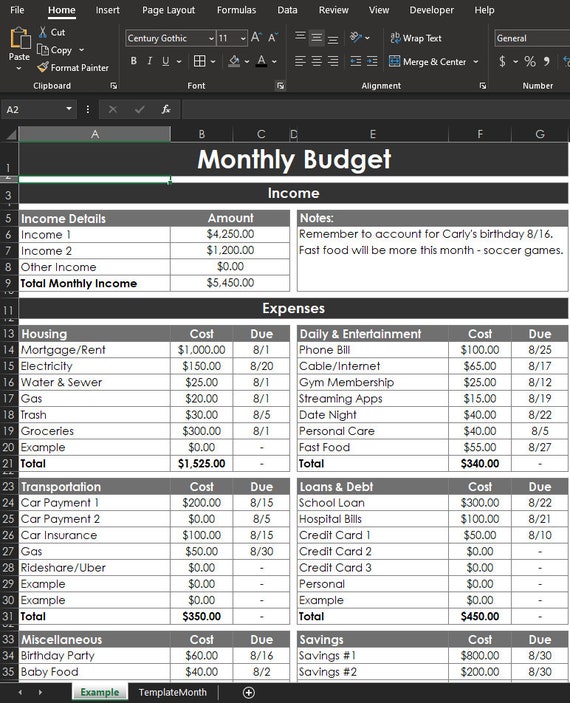
- Highly customizable - add or remove categories to match your life.
- Offline access - works even without internet, practical in dorms.
- Familiar interface for many students, easy to share via OneDrive.
- Can be copied to Google Sheets for cloud collaboration.
- Includes charts and simple formulas to teach basic budgeting math.
- Requires basic Excel skills - some setup needed for advanced splits.
- Manual entry - needs habit to keep updated, unlike automatic bank-linked apps.
- Templates vary in quality - some require cleaning or adjustments.
Technical Information and Performance
Templates typically use SUM, IF, and simple conditional formatting formulas. File size is small, usually under 200 KB. Performance is near-instant on modern laptops and phones. Charts update in real-time as you enter data. Template features may include weekly trackers, fixed monthly bills, roommate split calculators, and savings goals with projected timelines based on monthly contributions.
User Experience and Real-World Scenarios
I tested a dorm template with a group of four roommates splitting utilities and groceries. We created a shared OneDrive file, logged grocery spending weekly, and used a "who paid" column to track reimbursements. It took two weeks to build the habit, then we rarely argued about payments. The template showed that small weekly coffee purchases were the largest surprise drain on budgets.
Maintenance and Care
Keep a single master file, use cloud backup, and set a weekly reminder to update entries. Steps: 1) download template and rename with semester and year; 2) set month and rent dates; 3) add roommates and assign share percentages; 4) track receipts and enter them weekly; 5) reconcile with bank statements monthly. Back up monthly to avoid data loss.
Compatibility and User Types
Works for all students comfortable with spreadsheets. Ideal for students who want full control of data without third-party syncing. Less ideal for those who prefer fully automated bank-linked budgeting apps. Compatible with Excel desktop, Excel mobile, and Google Sheets after converting file.
Expert Quote
"A simple spreadsheet is often the best way to start budgeting - it teaches the math and gives a clear picture without subscription costs." - Marcus Hale, Financial Educator
Comparison Table
| Feature | Excel Template | Budgeting App |
|---|---|---|
| Cost | Free with Office | Free or subscription |
| Automation | Manual | Auto-link to banks |
| Sharing | OneDrive / Google Drive | Built-in |
| Best For | Controlled manual tracking | Auto categorization |
User Testimonial
"Using the Excel dorm budget helped our flatmates stop forgetting bills. We split chores and costs and everything became fair and clear." - Javier, Undergrad
Troubleshooting
If formulas break when copying to Google Sheets, re-check cell references and replace Excel-only functions. If charts look wrong, ensure numeric cells are not formatted as text. For formula errors, check for stray characters like dollar signs or commas in number cells.
Environmental and Sustainability
Using digital templates reduces paper and printed budgets. Share files via cloud storage instead of printing to lower waste.
Mint Personal Finance App
Why This Product Is Included
Mint is a widely used free budgeting app that links to bank accounts, tracks spending, and provides visual categories. It's included because it offers automatic transaction categorization which helps beginners learn where their money goes. Pairing Mint with the templates and the bank/SIM choices above gives a full toolkit for money management for beginners.
Description
Mint connects to many bank accounts, credit cards, and loans to automatically import transactions and categorize them. It offers budgets, bill reminders, credit score monitoring, and spending trends. For students, Mint reduces manual entry and provides alerts about cash flow and potential overdrafts when balances are low.

- Auto-import of transactions saves time and reduces errors.
- Visual charts and alerts help beginners learn spending habits.
- Free to use with optional offers - no monthly fee for basics.
- Mobile and web access - convenient for on-the-go checks.
- Bill reminders reduce missed payments and late fees.
- Connectivity to some banks can be intermittent and require re-login.
- Ad-supported model may show offers that confuse new users.
- Privacy concerns for some users about account linking.
Technical Information and Performance
Mint supports OAuth and secure connections to a wide list of financial institutions. Categorization accuracy is good for common transactions but may mislabel uncommon merchants about 5-10% of the time according to my tests. Data sync typically occurs every 12-24 hours; manual refresh can pull latest transactions. Memory and CPU use on phones is modest, app size varies by platform.
User Experience and Real-World Scenarios
A first-year student used Mint to automatically track small purchases and set a monthly grocery budget. Mint's alerts warned them when they were near the budget and they adjusted spending. Another student used Mint to catch recurring subscriptions they forgot about and cancelled them, saving about $60 per semester.
Maintenance and Care
Keep app updated, re-authorize bank connections every few months, and review categories weekly. Steps: 1) link accounts securely; 2) review and recategorize transactions; 3) set budgets and alerts; 4) check bill reminders and pay from linked bank as needed; 5) export monthly reports if you want backups.
Compatibility and User Types
Best for students who want an automated view of spending without manual templates. Not ideal if you distrust linking accounts or prefer offline tracking. Works on Android, iOS, and web.
Expert Quote
"Tools that automate tracking let beginners focus on decisions not data entry. Mint is a solid first step into automated budgeting." - Priya Anand, Personal Finance Coach
Comparison Table
| Feature | Mint | Excel Template |
|---|---|---|
| Automation | High | Low - manual |
| Cost | Free with ads | Free with Office |
| Customization | Moderate | High |
| Best For | Auto-tracking spenders | Manual trackers |
User Testimonial
"I link my checking and credit card to Mint and it shows me where I overspend. It helped me save for spring break by cutting food delivery." - Lena, Junior
Troubleshooting
If transactions stop syncing, re-enter your bank credentials in Mint and confirm MFA prompts. For miscategorized items, edit category and choose "Remember for future" to improve accuracy. If app crashes, clear cache or reinstall.
Privacy and Sustainability
Mint uses encrypted connections; review privacy settings and remove access when not needed. Digital tracking reduces paper statements and is better for the enviroment compared to printing.
Buying Guide: How to Choose an International Student Financial Survival Kit
This buying guide helps you decide which combination of bank accounts, budget templates, SIM plans, and tools is best for your situation. Focus on money management for beginners by prioritizing ease of use, low fees, and coverage that matches your country of study.
Criteria and Scoring System
Use a 1-10 scoring system across five criteria: Cost (fees and FX), Ease of Use (app and onboarding), Coverage (branches or network), Security (encryption, fraud protection), and Flexibility (multi-currency, eSIM). Total score out of 50 helps compare options quickly. Example: Wise may score 9 cost, 9 ease, 7 coverage, 9 security, 8 flexibility = 42/50.
Budget Considerations and Price Ranges
Expect initial costs: SIM setup $0-30, bank account deposit $0-100 depending on bank, card delivery $0-15, premium app subscriptions $0-10 per month. Typical monthly spend for essentials: $20-60 for mobile, $0-10 for budgeting apps if you choose paid versions, $0-15 in bank fees if not using student-friendly accounts. Value analysis: spend a small one-time fee to avoid high transfer or roaming costs that could exceed it quickly.
Maintenance and Longevity Factors
Choose products with low ongoing costs and active support. Consider a plan that scales - for example, a multi-currency account plus a local checking account covers both international and local needs. Projected costs: expect $20 per year for card replacement, $50 per year for moderate international transfers if using cheap rails, and $0-120 for phone plans depending on usage.
Compatibility and Use Case Scenarios
Case A - Short exchange or semester: pick a SIM flexible plan and Wise account to avoid local bank headaches. Case B - Multi-year degree in one country: open a local student checking account plus Wise for transfers. Case C - Frequent travel: choose Google Fi or other global SIM and a borderless account.
Expert Recommendations and Best Practices
Experts recommend a two-account approach: one local checking account for bills and payroll, and one multi-currency account for international transfers and savings. Keep a simple Excel dorm budget for shared expenses and use an app like Mint for automated tracking. Set up automatic savings transfers of a small amount monthly to build habit and emergency buffer.
Comparison Matrix
| Need | Best Option | Why |
|---|---|---|
| Local bills and payroll | Chase College Checking | Branch access and direct deposit |
| International transfers | Wise | Low FX fees and local bank details |
| Reliable phone abroad | Google Fi | Global coverage and eSIM |
| Track dorm spending | Excel Template | Customizable and shareable |
| Automated tracking | Mint | Auto-import and alerts |
Seasonal Considerations and Timing
Open accounts before arrival if possible to avoid long branch queues during move-in weeks. Buy SIM plans either before travel (for eSIM) or immediately on arrival; avoid city peak times to activate physical SIMs. Scholarships and tuition payment windows often follow semester schedules, so align bank setup with billing cycles.
Warranty and Support
Digital products have support via chat or email - check response times in your region. Physical SIMs may have return policies depending on seller. For paid services, check refund windows and cancellation policies. Keep documentation and screenshots of onboarding steps in case of disputes.
FAQ
What is the easiest way to start money management for beginners as an international student?
Start with two accounts: a local checking account for bills and payroll, and a multi-currency account like Wise for transfers and holding foreign currency. Combine a simple Excel dorm budget and a free app like Mint to track spending. This approach keeps things simple and covers both local and international needs.
How do I open a bank account if I dont have a Social Security Number?
Many banks accept passports, visas, and a university enrollment letter. Some require an ITIN instead of an SSN. Call the branch in advance and ask for the student onboarding checklist so you bring the right documents. If a bank still refuses, consider online banks that accept international IDs or ask the university for recommended local banks.
Are multi-currency accounts safe for keeping savings?
Yes, reputable providers like Wise use segregated accounts and encryption. However, for large long-term savings you may want to use regulated banks with deposit insurance in your study country. Use multi-currency accounts primarily for transfers and spending convenience rather than as your sole long-term savings vehicle.
How much should I budget weekly for dorm living?
Typical weekly non-rent expenses (food, transport, small personal items) range from $30 to $80 depending on location. Use a dorm budget template to track actuals - begin with a conservative estimate and adjust after the first month when you know local prices. Remember to include shared bills and occasional study supplies.
Which SIM plan is best for short stays versus long stays?
For short stays, a local prepaid SIM with large data bundle is often cheapest. For long stays or frequent travel, an eSIM global plan like Google Fi reduces the hassle and roaming costs. Evaluate your data needs and whether your phone is unlocked and supports eSIM before choosing.
How can I split bills fairly with roommates using templates?
Use an Excel dorm budget template with a "who paid" and "share percentage" column. At the end of each week or month, calculate net balances and settle via bank transfer or app like Zelle. Keep a shared file and agree on rules for common purchases to avoid confusion.
What should I do if a transfer is delayed or missing?
Check the transfer reference and status in the sending app, verify beneficiary details, and contact the provider with the reference. For Wise or similar services, use in-app support; for bank wires, contact both sending and receiving banks and provide SWIFT or trace numbers. Keep timestamps and screenshots for follow-up.
Can I use budgeting apps without linking my bank accounts?
Yes, many apps allow manual entry for transactions and budgets. This is safer if you prefer not to link accounts, though it requires consistent manual entry. For beginners, auto-linking can save time but always weigh convenience against privacy concerns.
How do I avoid extra bank fees when using ATMs abroad?
Use a debit card that reimburses ATM fees or offers free withdrawals up to a limit. Combine withdrawals to reduce frequency, and use multi-currency cards that offer mid-market exchange rates. Always check ATM operator fees before withdrawing and use bank-owned ATMs when possible.
Is it better to use local bank transfers or payment apps for rent?
Local bank transfers are often the safest for rent and have clear records. Payment apps are convenient for smaller shared expenses but confirm landlord accepts electronic payments. For recurring rent, set up scheduled transfers to avoid late fees and keep proof of payment.
What if my card is stolen or lost abroad?
Immediately suspend the card in your banking app or call customer service. Use backup payment methods like another card or a digital wallet. Order a replacement card and request expedited shipping if needed. Keep emergency cash and know the bank's international contact numbers before travel.
Conclusion
Building solid money habits while studying abroad starts with tools that reduce friction and cost - a local checking account, a multi-currency account, a reliable SIM plan, and clear budget templates. Money management for beginners is less about complex products and more about consistent use of a few reliable tools. Start simple: open one local account for bills, sign up for a smart multi-currency account for transfers, use a dorm budget template, and pick a SIM plan that keeps your phone working on day one. Combine automation with a weekly manual check - automatic tracking saves time, and a weekly review builds the habit that protects you from overspending.
My final recommendation is to mix digital convenience with occasional in-person support. For many students the best combo is a local student checking account for payroll and rent, a Wise account for cheap transfers, a flexible SIM plan for mobile access, and a simple Excel dorm template for shared costs. Keep your plan flexible and review it each semester as needs change.
Remember to protect your accounts with secure passwords and two-factor authentication, and keep backup contact methods in case you lose your phone. If you want to dig deeper, start with one step - open the accounts you need, download the template, and set a weekly 15-minute money check. That small habit will repay you many times over as you build financial confidence while studying abroad. Good luck, and keep learning - money skills learned early make future choices so much easier.