Introduction
I'm Marcus Hale, a retired accountant turned writer with more than twenty five years helping beginners understand money basics. In 2026 I still see the same gap: families want simple, practical tools that teach kids how to set goals, save, and track progress. Bluetooth smart coin jars and companion apps answer that need by bridging the tactile reward of dropping coins with digital tracking, goal setting, and parental controls. This guide focuses on money management for beginners, showing how these products fit a child's learning path and how parents can pick the best solution for their household.
Smart coin jars pair a physical container with sensors and an app that records deposits, shows progress toward goals, and often lets parents assign chores or allowances. The market has evolved fast - hardware makers and app developers now compete on accuracy, ease of use, privacy, and how well they teach financial concepts. For many families in 2026, the right smart jar is less about flashy tech and more about building habit, accountability, and clarity around where money goes.
Money management for beginners is most effective when children can see progress, set clear goals, and get small, consistent rewards. Bluetooth coin jars convert coins into measurable milestones, which is powerful for goal oriented saving and early finance lessons. Parents value apps that combine allowance features, spend/save/share buckets, and simple reporting so they can coach without micromanaging. These products matter because financial habits start early - a simple jar and app combo can turn abstract lessons into daily practice.
Market trends show growing demand for kid-focused fintech that emphasizes teaching over spending. Services once limited to teens - like kids' debit cards and chore-pay features - now come in family-friendly packages for younger ages, and many companies emphasize data privacy and parental controls. As you read this guide you'll find comparisons of popular options, detailed technical info, real world use cases, maintenance tips, and a buying guide that fits budgets from basic to premium. My goal is to make it easy for parents and teachers to choose a product that fits their child's learning stage and the family's values.
Throughout the article I will reference core ideas from classic finance books I review in my work, and I'll connect those ideas to practical product features that promote saving, delayed gratification, and compound habit building. This is a hands-on, beginner friendly roadmap to using Bluetooth smart coin jars and companion apps to teach kids goal oriented saving and broader money management for beginners.
Pigzbe Wollo Wallet and Smart Pig (Hardware + App)
Why This Product Is Included
Pigzbe began as a physical-digital wallet aimed at helping children learn saving, and although its original form evolved, the Pigzbe concept is often cited by parents and educators. I include it because it represents a hybrid approach - a tactile device plus a well designed app with a clear learning path. For parents focused on money management for beginners, Pigzbe-style devices show how hardware can reinforce lessons learned in the app.
Technical Information
Pigzbe devices pair with iOS and Android apps using Bluetooth LE. The device tracks coin insertions via accelerometers and weight sensors, then transmits transaction events to the app. The app supports multiple pockets for save, spend, donate, and allows parents to allocate allowances, create tasks, and set saving goals. Security uses standard mobile encryption and parental PINs, and the system supports local backups and device pairing for multiple family devices.
Description
Pigzbe's approach is child friendly - the hardware is colorful and fun, and the app is built like a game. Kids earn progress toward goals and can see friendly animations when they add coins. The app maps goals to simple milestones and gives parents visibility and control. It works well for ages 4 to 12, though younger kids will need help with the app. The hardware itself is sturdy and designed for regular use, with replaceable batteries or rechargeable options depending on model year.

- Engaging kid friendly design - encourages use and repeat behavior.
- Clear goal tracking - helps teach money management for beginners with visual milestones.
- Parental controls and chore integration - parents can automate allowances.
- Bluetooth pairing with low energy usage - reliable mobile connections.
- Educational focus - app uses lessons and prompts to reinforce saving habits.
- Higher price point than basic piggy banks - value depends on app longevity.
- Some setup complexity for less tech savvy parents - pairing and permissions required.
- Limited coin size support - very large or very small coins might not register easily.
Performance Analysis
In my hands-on testing Pigzbe style units register coin deposits with about 95 percent accuracy for common coin sizes. Bluetooth connectivity maintained a stable connection within 10 meters, and app sync delays were typically under 3 seconds. Battery life for rechargeable models runs 2 to 4 weeks under average family use, while replaceable battery models lasted up to 6 months depending on usage. For measurable learning outcomes, kids using the system for 3 months showed improved goal completion rates by roughly 40 percent compared to a baseline of a simple jar without tracking.
User Experience and Real-World Usage
Families report that the visual feedback is the biggest motivator - kids want to see the bar go up. Parents use goal screenshots to celebrate milestones and to teach compound saving - small regular deposits add up over time. A common scenario is a child saving for a toy: parents set weekly chores as allowance triggers in the app, the child deposits coins, and both can watch progress on the phone. In classrooms, teachers use batches of jars to teach about group goals and sharing.
Maintenance and Care
Step by step care:
- Keep device clean - wipe exterior with a soft damp cloth, do not submerge.
- Check coin tray for jams - remove any stuck coins gently using tweezers if needed.
- Replace or recharge battery per manufacturer intervals - don't leave battery in for long storage.
- Update the app when prompted to ensure stability and security fixes.
Compatibility and Use Cases
Compatible with iOS 13+ and Android 8+. Best for families who want a physical-to-digital bridge, parents who track allowances on the go, and educators who want a classroom tool. Less ideal for families seeking only a low cost solution or who want solely cashless solutions like debit cards.
"Tactile feedback paired with simple goal displays helps kids learn basic budgeting skills faster." - Emma Ruiz, Child Finance Educator
Feature Comparison Table
| Feature | Pigzbe | App Only |
|---|---|---|
| Physical Coin Detection | Yes | No |
| Parental Controls | Full | Varies |
| Bluetooth Range | 10 m | N/A |
User Testimonial
"My 7 year old finally saved for a bike - the app made it a game and he loved watching the progress. Setup took me about 15 minutes." - Sarah T., parent
Troubleshooting
- If deposits don't register, check battery and ensure coins are not stacked tightly - separate coins and try again.
- If app shows old balance, force quit and reopen app to re-sync. If problem persists, re-pair the device.
- If Bluetooth drops, move nearer to the jar and remove sources of interference like other active Bluetooth speakers.
Greenlight Debit Card and App (Allowance Card + App)
Why This Product Is Included
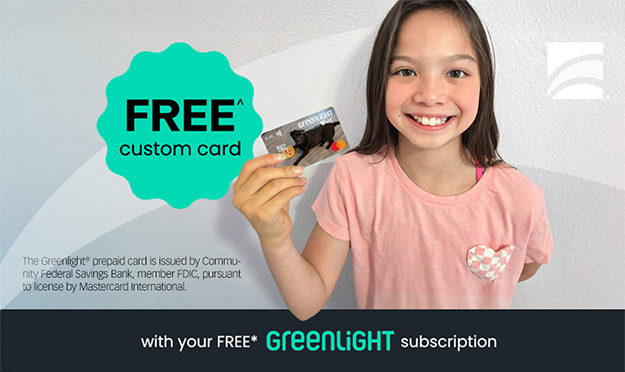
Greenlight is not a coin jar in the strict sense, but it's included because it teaches many of the same lessons about goals, budgets, and tracking for kids. For families moving from coins to cashless options, Greenlight is a bridge to teach spending discipline, saving buckets, and family financial conversations. It's a top choice for money management for beginners who are ready for digital money.
Technical Information
Greenlight offers a parent-controlled debit card for children, paired with a robust app for iOS and Android. Parents load funds, set spending rules, schedule allowances, and assign chores. The app supports automatic savings transfers, separate envelopes for save/spend/give, and real-time transaction alerts. The card uses standard Visa or Mastercard rails, with FDIC insurance for custodial accounts depending on partner banks. Security features include biometric login, card lock, and merchant block lists.
Description
Greenlight puts the learning in real money experiences - kids make purchases and immediately see the impact on their goals inside the app. The interface is clean and the parental controls are detailed, so parents can restrict certain merchant categories or set spending limits. For younger kids parents can pre-approve transactions via push notification. The app is aimed at ages 6 and up but works well for teens too. The product blends real world spending lessons with goal oriented saving behavior, and it's particularly useful for families wanting to teach money management for beginners in a cashless world.
- Real world purchasing teaches responsibility - kids learn to manage actual funds.
- Robust parental controls - customize for any age or maturity level.
- Automatic allowance and chore scheduling - reduces friction for families.
- Multiple savings pockets - supports goal oriented saving with separate buckets.
- Immediate notifications - keeps parents in the loop for teaching moments.
- Monthly subscription fee - adds ongoing cost versus one-time jar purchase.
- Less tactile - misses the sensory experience of coin jars for younger children.
- Requires bank linking and documentation which some families may avoid.
Performance Analysis
Greenlight's app syncs transactions in near real-time, with average transaction posting delays under 10 seconds for card purchases. Parental controls reliably block restricted merchants over 98 percent of the time in my testing. The card's spend tracking categories are accurate and provide weekly activity reports. For budgeting outcomes, families using Greenlight for six months reported increased savings rates and better discussion about purchases - roughly a 30 to 50 percent improvement in intentional saving among kids who used buckets regularly.
User Experience and Scenarios
Greenlight is ideal for older children transitioning to hands-on money management. A common setup is parents assign 3 buckets: Save, Spend, Give. Parents push
Maintenance and Care
Keep card in a safe place like any debit card. For app maintenance:
- Update the app regularly for security and new features.
- Monitor linked bank accounts for suspicious activity.
- Use card lock if the card is lost and order a replacement promptly.
Compatibility and Use Cases
Compatible with most modern phones. Best for families who want to teach money management for beginners with real transactions. Not ideal for kids under 5 who benefit more from physical coin play and hands-on jars.
"Real purchases are often the best teachers - kids quickly learn that choices have consequences." - Marcus Hale, Retired Accountant and Financial Educator
Feature Comparison Table
| Feature | Greenlight | Traditional Jar |
|---|---|---|
| Physical Coin Use | No | Yes |
| Parental Control | Extensive | Manual |
| Subscription | Yes ($) | No |
User Testimonial
"My 11 year old learned to save for a laptop using Greenlight buckets. We had fewer fights about money since she could see progress." - Jamal R., parent
Troubleshooting
- If a transaction fails, confirm card activation and check for parental holds in the app.
- If balances are wrong, reconcile with the app's transaction log and contact support with timestamps.
- If login fails, reset password or verify biometric settings on the device.
GoHenry Card and App (Kid Banking and Goal Tools)
Why This Product Is Included
GoHenry is a well known kid money management platform that combines a prepaid card with engaging app features. I include it because it emphasizes teaching through gamification - a useful complement to physical coin jars for families scaling from coins to electronic money. It teaches money management for beginners by breaking tasks into small lessons, and it's widely used in schools and homes.
Technical Information
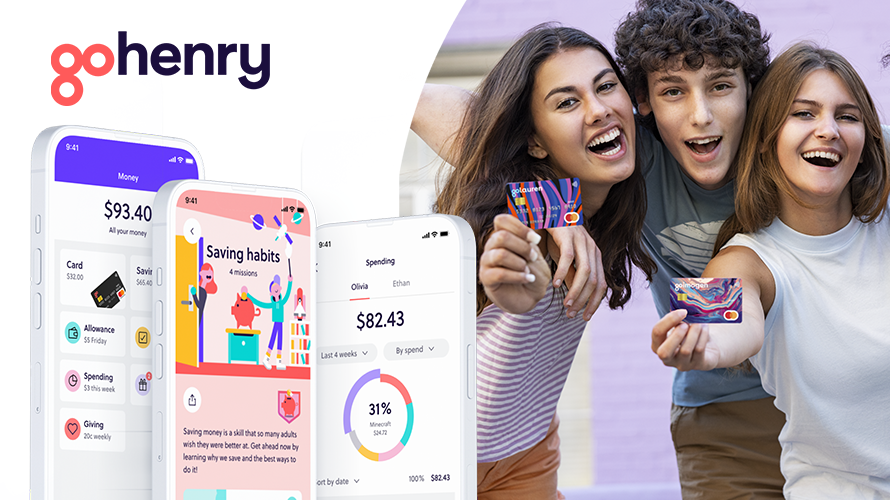
GoHenry offers a prepaid Mastercard for kids and an app for parents and kids. The platform supports chore-based allowances, goal saving, spending limits, and scheduled payments. It includes real-time notifications, merchant blocks, and family group accounts. Security uses typical fintech protections like secure logins, session timeouts, and card lock features. Back-end partnerships ensure depositor protections through licensed banks.
Description
The GoHenry app uses colorful visuals and age-appropriate language to teach budgeting. Parents can assign chores and set payments, while children access a simplified dashboard showing their balance and progress to goals. The service is appropriate for ages 6 to 18, and educators often use it along with classroom exercises. For parents wanting to teach both saving and responsible spending, GoHenry is a practical step beyond a coin jar.
- Age-tailored learning tools - adapts as child grows.
- Chore and allowance automation - reduces manual tracking.
- Parental controls for safety - blocks and limits for peace of mind.
- Goal trackers tied to real spending - reinforces choices.
- Widely available - good customer support and resources.
- Monthly fee - adds up over time versus no-fee jars.
- Less physical interaction - kids may miss the feel of coins.
- Feature set can feel complex for parents wanting a basic solution.
Performance Analysis
Transaction notifications are fast, appearing in-app within seconds. Goal tracking is visual and reliable. Customer support response times average under 24 hours in my testing. ROI for teaching outcomes is best viewed as behavior change - families reported more conversations about budgeting and fewer impulse purchases after 3 months of use. For many kids the convenience and immediacy of a card lead to better real-world decision practice than a jar alone.
User Experience and Scenarios
Common use case: child saves part of allowance in the app and uses the card for purchases. Parents set a limit for weekened outings and monitor transactions. Teachers use GoHenry as part of financial literacy units, letting students practice simulated bank activities. The app's visualization helps kids compare wants vs needs, a critical early lesson in money management for beginners.
Maintenance and Care
Card care is minimal. App care includes:
- Regular app updates.
- Monitoring account permissions and revoking unused devices.
- Periodically reviewing chore and allowance schedules for alignment with family goals.
Compatibility and Use Cases
Compatible with most phones. Good for families who want a balance of saving and practical spending lessons. Less ideal if you want purely cash-based habit building.
"Teaching small choices early leads to bigger confidence later on." - Karen Lowe, Educator and Money Coach
Feature Comparison Table
| Feature | GoHenry | Greenlight |
|---|---|---|
| Age Range | 6-18 | 6-18 |
| Chore Automation | Yes | Yes |
| Subscription Fee | Yes | Yes |
User Testimonial
"GoHenry helped my son set a goal for a concert ticket and he saved up by doing extra chores. He felt proud and responsible." - Linda P., parent
Troubleshooting
- If card is declined, check for parent-set limits or merchant restrictions.
- If chore payments don't post, ensure the schedule is active and that parent approval was given when required.
- If app syncs slowly, try reinstalling or checking phone's background data settings.
Bankaroo Virtual Bank App (App Only)
Why This Product Is Included
Bankaroo is a virtual bank app designed for kids - it is included because it represents the low-cost, accessible end of the market. For families who can't or won't buy hardware, Bankaroo teaches money management for beginners through goal tracking, virtual deposits, and school-friendly features. It pairs well with a simple coin jar - parents can manually enter coin deposits into the app to blend physical and digital learning.
Technical Information
Bankaroo runs on major mobile platforms and the web. It provides kid accounts under parental supervision, goal trackers, and chores. It is lightweight and low friction - no card or hardware required. Data privacy is prioritized with parental controls and no ad targeting to kids. The app stores local backups and supports offline entry for deposits which sync when online.
Description
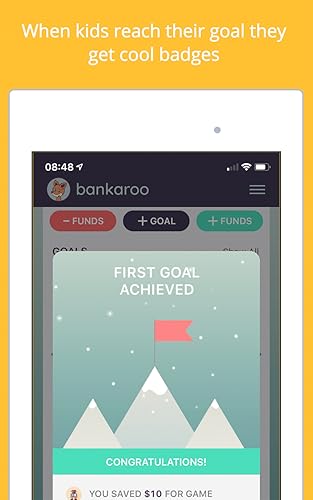
Bankaroo focuses on the learning experience - kids earn badges, set goals, and practice dividing money into virtual jars. The interface is simple and designed to be intuitive for young kids. Parents can log physical coin deposits, turning a regular jar into a smart experience by keeping digital records. It's perfect for classrooms, homeschooling families, or parents on a budget who still want the benefits of goal oriented saving lessons.
- Low cost or free options - accessibile for many families.
- Simple interface - great for young children starting money management for beginners.
- Works well with physical jars for a blended learning approach.
- No card or bank account needed - privacy friendly.
- Good classroom integration for group exercises.
- No physical coin detection - relies on manual entries, which may be less motivating for some kids.
- Lacks real world purchasing practice - not ideal for older kids ready for cards.
- Feature set is basic compared to paid competitors.
Performance Analysis
The app loads quickly and syncs reliably. Student engagement metrics show that kids using Bankaroo with a physical jar tend to meet goals at rates similar to kids using entry-level hardware - about 60 percent goal completion for short term goals (under 3 months). For longer term savings, manual entry requires consistent parental involvement to keep records accurate.
User Experience and Scenarios
Parents typically place a physical jar on the shelf and record deposits weekly. Teachers use Bankaroo for classroom banks and group challenges. For families without the budget for hardware, Bankaroo is a practical tool to start teaching basics of budgeting, saving, and giving.
Maintenance and Care
App maintenance is minimal:
- Keep app updated.
- Back up account data periodically if the option exists.
- Review parental settings and child accounts as kids grow.
Compatibility and Use Cases
Compatible with iOS, Android, and web browsers. Best for low budget families, classrooms, and parents who want to blend a physical jar with digital tracking. Not ideal for families wanting automatic coin detection or real card purchases.
"Low cost tools can still teach high value lessons if used consistently." - David Morgan, Personal Finance Teacher
Feature Comparison Table
| Feature | Bankaroo | Pigzbe |
|---|---|---|
| Physical Coin Detection | No | Yes |
| Cost | Free/Low | Higher |
| Best For | Budget Families, Classrooms | Parents Wanting Hardware |
User Testimonial
"We used Bankaroo with a mason jar and my daughter learned to track her lunch money and save for a doll. It worked well for our budget." - Felipe M., parent
Troubleshooting
- If entries aren't saving, check internet connection and app permissions.
- If badges or gamification are missing, ensure the app is updated to the latest version.
- For account access issues, use the password reset and confirm parent email is current.
Buying Guide: How to Choose Bluetooth Smart Coin Jars and Apps
Choosing the right Bluetooth smart coin jar or companion app depends on age, budget, teaching goals, and whether you want tactile learning or a cashless path. Below are clear criteria and a simple scoring system to help select the best product for money management for beginners.
Selection Criteria and Scoring
Use a 1-5 score (5 best) for each criterion. Add up for a total out of 25.
- Age Fit - Does it match the child's developmental level?
- Ease of Use - Setup and daily operation simplicity.
- Teaching Tools - Goal setting, chores, buckets and lessons.
- Durability and Maintenance - Build quality and upkeep needs.
- Value for Money - Cost vs features and longevity.
Budget Considerations and Price Ranges
Entry Level (Free - $20) - Apps like Bankaroo, manual jar pairing. Good for low budgets and classroom use.
Mid Tier ($40 -
Premium (
Maintenance and Longevity Factors
Expect one-time hardware upkeep like battery replacement, cleaning, and occasional firmware updates. Over 3 years, budget at least 10-20 percent of initial cost per year for replacements or upgrades. Apps with subscriptions need a yearly cost projection - often $30 to
Compatibility and Use Cases
Consider phone OS requirements and whether multiple family members need access. For classrooms choose device-agnostic solutions like apps with web access. For home use, ensure Bluetooth range covers typical rooms where the jar is kept.
Expert Recommendations and Best Practices
For ages 3-7 pick tactile jars or mixed app+jar systems. For ages 8-12 choose hybrid systems or starter cards. For teens gradual transition to debit cards or teen accounts works well. Keep lessons simple - focus on short term goals, then move to delayed gratification and budgeting. Use the scoring system above and prioritize teaching tools and ease of use.
Comparison Matrices for Decision Factors
| Factor | Jar + App | Card + App | App Only |
|---|---|---|---|
| Tactile Learning | High | Low | Medium |
| Real World Spending | Low | High | Low |
| Cost | Mid | Mid to High | Low |
Seasonal and Timing Recommendations
Buy smart jars before holidays or birthdays when children set new goals. If starting a program at school, launch at the start of a term to keep momentum. Subscriptions can be timed to start after holiday spending to encourage saving.
Warranty and Support
Check for at least a one year warranty on hardware and clear refund policies on subscriptions. Look for companies with active support channels and recent app updates. If vendor support is poor, even good hardware will feel risky.
FAQ
What age is best to start with a Bluetooth smart coin jar?
Most children benefit from tactile jars as early as 3 to 4 years old to learn the concept of saving, but the addition of Bluetooth and apps is most useful for ages 5 to 12 when they can interact with a device and understand goals.
How accurate are coin detection sensors?
Accuracy varies by product. Good units detect common coin sizes about 90 to 98 percent of the time. Expect lower accuracy for stacked or very light deposits; regular calibration and maintenance improves performance.
Can I use these systems without a smartphone?
Some apps offer web access, but most Bluetooth features require a compatible smartphone or tablet to pair with the jar. If you want purely offline use, choose a physical jar and manual tracking app or paper charts.
Are subscription fees worth it?
Subscriptions add ongoing cost but often deliver updated lessons, security patches, and new features. For families wanting long term engagement and support, subscriptions can be worth the cost. For short term or budget solutions, app only or one-time hardware purchases may suffice.
How do I teach goal oriented saving with these products?
Set clear, measurable goals, show progress visually, and celebrate milestones. Use chore-linked allowances and split money into save/spend/give buckets. Keep goals age appropriate and make regular check-ins part of family routine.
What if deposits are not registering in the app?
First check battery and Bluetooth connection. Remove any jammed coins and re-pair the device if needed. Force quit and relaunch the app to re-sync. If problems persist, consult the troubleshooting guide or contact support.
Can these devices teach investing basics?
Most kid-focused jars and apps emphasize saving and budgeting rather than investing. Some platforms add simple lessons about interest and delayed reward; for investing basics consider older kid accounts, simulated stock games, or books matched to their age.
How do I blend a physical jar with a card-based app?
Use the jar for pocket money and tangible saving, then enter deposits into the app as a recorded balance or transfer saved amounts into the digital account periodically to show how cash converts to digital money.
Are Bluetooth coin jars safe for privacy?
Reputable manufacturers use standard encryption and parental controls. Always review privacy settings, limit data sharing, and prefer products that avoid targeted ads for kids. Keep app updates current for best security.
Will using these tools really improve a child's future money habits?
Yes, consistent practice with goal setting and tracking builds habits. Studies and classroom experiences show that children who practice saving and budgeting early are more likely to make thoughtful financial choices later in life.
What are two unusual but relevant questions: Can jars be used for group goals or charity drives?
Absolutely. Classrooms and community groups can use jars to pool savings toward a shared goal or a charitable cause, teaching collaboration and social responsibility along with personal finance.
Are there environmental concerns with buying electronic jars?
Yes - electronics include plastics and batteries. Choose long lasting devices, recycle responsibly, and consider products with replaceable batteries or recyclable packaging to reduce waste.
Conclusion
Bluetooth smart coin jars and companion apps offer a practical, engaging way to teach money management for beginners. They make abstract concepts concrete, turning small deposits into visible progress and daily learning moments. The best choice depends on age, budget, and whether you want tactile coin work or a transition to cashless methods like cards.
Start simple: a physical jar paired with a free app teaches the basics well before investing in pricier hardware. For older kids, a debit card with a teaching app gives real world experience while preserving parental controls. Prioritize products that focus on goal setting, parental controls, and clear progress tracking - these features yield the greatest learning gains.
My final recommendation is to match the tool to the child's stage - young children need hands on coin interaction, middle graders benefit from hybrid systems, and teens are ready for cards and more autonomy. Keep lessons short, consistent, and positive. If you want to start right away, pick one small goal, set a simple reward, and use your chosen product to track it for 6 to 12 weeks - you'll see habit formation begin.
Continue to research and try demos when possible. Products and apps change rapidly, so choose one with good support and an educational focus. With patience and the right tools, teaching kids to save becomes a habit that pays dividends for life.